
For decades, legacy ETL platforms like Informatica PowerCenter have been the unsung heroes of retail data integration. They powered critical workflows—moving pricing, promotions, inventory, vendor feeds, and planning data across sprawling enterprise systems. Reliable? Absolutely. But in today’s fast-paced, cloud-driven world, these systems have become more of a bottleneck than a backbone.
As data volumes explode, APIs proliferate, and business teams demand agility, traditional ETL platforms struggle to keep up. And with Informatica PowerCenter nearing end-of-support, retailers face a pivotal moment: Do we simply migrate—or do we reinvent?
Spoiler alert: The smart ones are choosing reinvention. This blog explores how retailers are re-architecting batch processing on Databricks, moving beyond “lift-and-shift” to build a modern, scalable, and resilient data integration platform.

Let’s be honest: most ETL migrations fail because they try to replicate old workflows line by line. The result? Years of technical debt carried forward—tightly coupled workflows, hidden dependencies, and manual recovery steps—just running on a shinier platform.
Retailers taking the Databricks route are doing something radically different. Instead of porting workflows, they’re rebuilding pipelines using cloud-native, code-centric principles, fully leveraging the Databricks ecosystem.
Key differences include:
- GUI mappings → Databricks notebooks written in PySpark and Spark SQL
- Distributed Spark processing for massive scalability
- Consolidation of multiple mappings into reusable, parameter-driven pipelines
- Integration of new sources like APIs, Delta tables, and cloud feeds
- Embedded controls for validation, reconciliation, audit, and idempotency
- Centralized metadata tables replacing hard-coded logic
- Reusable components for notifications and data transfers
- Simplified handling of complex file formats using Spark
- Mapping legacy functions (e.g., IIF() → CASE WHEN or when() in PySpark)
- Custom Java logic → Python-based implementations
The result is not just a migrated system, but a simpler, faster, and far more resilient batch platform.
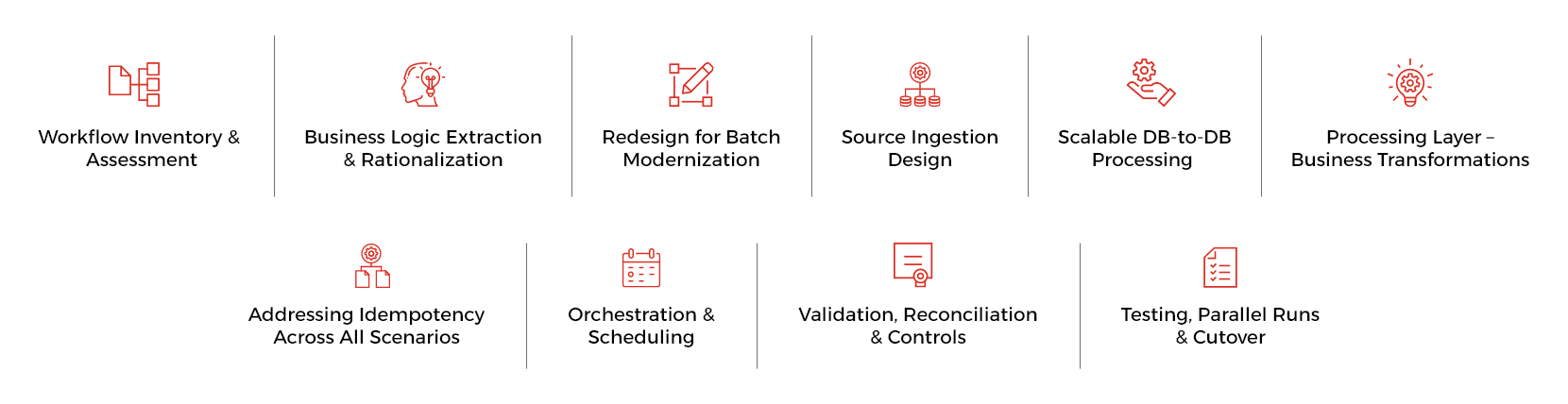
1. Workflow Inventory & Assessment
The migration starts with a detailed catalog of all Informatica PowerCenter components, including workflows, mappings, mapplets, expressions, shell scripts, custom Java code, pipelines using persistent variables, sessions, and schedulers.
Each workflow is assessed to understand:
- Source and target systems
- Runtime SLAs and overnight batch windows
- Upstream and downstream dependencies
- Data volumes, growth trends, and failure history
Workflows are then classified into simple, medium, and complex categories. This helps prioritize migration sequencing and identify early candidates for consolidation or redesign.
2. Business Logic Extraction & Rationalization
Teams extract and document business logic embedded in expressions, lookups, filters, and aggregations.
This phase focuses on:
- Identifying duplicated rules implemented across multiple workflows
- Removing hard-coded thresholds, dates, and environment-specific values
- Challenging legacy assumptions that no longer align with current business needs
The refined logic is validated with business and analytics teams and then converted into reusable notebook functions and Spark SQL modules, creating a shared logic layer.
3. Redesign for Batch Modernization
Workflows are redesigned to support modern batch requirements:
- Incremental processing using centralized watermark tables instead of session variables
- Safe reruns, backfills, and replays without manual cleanup
- Improved parallelism and throughput using Spark’s distributed execution
Standardization is enforced across all pipelines, including audit columns, error-handling patterns, naming conventions, and folder structures. All designs are made Unity Catalog–compatible, ensuring enterprise-grade governance from day one.
4. Source Ingestion Design
A polyglot ingestion strategy is adopted, using the right tool for each job:
| Source Type | Modernized Approach |
|---|---|
| SQL / Oracle | Parallel JDBC reads with centralized watermarking |
| CSV / Excel | Schema-driven ingestion with file-level state tracking |
| Delta Tables | Snapshot- and version-aware Delta reads |
| APIs | Token-based REST ingestion with retries and idempotency |
All ingestion logic is implemented using parameterized Databricks notebooks, allowing the same framework to onboard new sources with minimal code changes.
5. Scalable DB-to-DB Processing
High-volume database-to-database integrations are redesigned to eliminate row-level updates that previously caused locking and performance issues.
The modernized pattern is:
- Extract source data in parallel using Spark
- Load into temporary Delta staging tables (or staging tables in the target database)
- Perform joins, transformations, and validations entirely within Databricks
- Generate set-based MERGE or UPDATE statements
- Apply atomic updates to target tables
This approach delivers linear scalability, deterministic reruns, and minimal impact on operational databases.
6. Processing Layer – Business Transformations
The processing layer handles core retail logic across ODS (Operational Data Store) data, POS transactions, sales, store operations, and customer information.
- Core business rules, validations, and data transformations
- Promotion eligibility and overlap rules
- Product enrichment and hierarchy alignment
Deduplication, standardization, and the generation of derived metrics are built directly into the pipelines. Databricks notebooks are optimized for large overnight batch volumes, predictable runtimes, and parallel execution across domains.
7. Addressing Idempotency Across All Scenarios
One of the most critical improvements is the explicit handling of idempotency—a common weakness in legacy ETL environments.
This migration standardizes idempotent behaviour across scenarios, including:
- Database-to-database processing
- File-to-database and database-to-file flows
- API ingestion and publishing
- SFTP transfers
- NAS and Databricks volume integrations
Centralized batch control tables, MERGE-based writes, file checksums, replay-safe API patterns, and atomic file publishing ensure that reruns are safe, predictable, and repeatable.
8. Orchestration & Scheduling
PowerCenter scheduling is replaced with a layered orchestration model:
- Databricks Workflows orchestrate notebook pipelines, handle retries, branching, and parameter passing
- TIDAL scheduler manages enterprise-wide dependencies and external triggers
- Batch identifiers and process dates flow end-to-end across all pipeline stages
This provides better visibility, SLA monitoring, and fine-grained rerun control than legacy schedulers.
9. Version Control & CI/CD (GitHub)
All notebooks and SQL artifacts are version-controlled in GitHub, organized by domain and pipeline.
The CI/CD pipeline supports:
- Automated validation and unit checks
- Environment promotion from Dev → Test → Prod
- Parameterized, repeatable deployments
This replaces manual XML exports with auditable, automated releases and safe rollback capabilities.
10. Validation, Reconciliation & Controls
Every pipeline includes:
- Source-to-target record counts
- Control totals for key retail metrics
- Business rule validations
- Automated failure alerts
- Deterministic rerun and recovery logic
Operational teams gain confidence that data is complete, accurate, and traceable.
11. Testing, Parallel Runs & Cutover
Testing is performed at multiple levels:
- Unit testing at notebook and module level
- Parallel runs with Informatica for comparison
- Performance benchmarking under production-scale loads
Cutover is executed in phases by business domain, followed by full Informatica decommissioning.
- 182 Informatica workflows retired
- 116 non-SAP workflows modernized
- Long-standing idempotency issues resolved
- New APIs and cloud-native sources onboarded
- Informatica platform fully decommissioned
- Unified, scalable batch integration platform on Databricks
Performance & Scalability
- Faster overnight batch windows
- Elastic compute during peak retail events
- Fewer failures and manual reruns
Cost Optimization
- Elimination of Informatica license costs
- Reduced infrastructure footprint
- Pay-as-you-use cloud economics
Agility & Modernization
- Faster onboarding of new data sources
- Reusable, configuration-driven pipelines
- Improved transparency, auditability, and maintainability
Migrating from Informatica PowerCenter to Databricks isn’t just a technical upgrade; it’s a strategic transformation. Retailers are seizing this opportunity to eliminate years of architectural debt and build a future-ready data integration platform.
By embracing Databricks notebooks, Workflows, TIDAL scheduling, GitHub-based CI/CD, and modern design principles, they’re moving from fragile ETL pipelines to robust, cloud-native data engineering systems built for change.

Aravindan TK is an accomplished Data Architect with 13 years of experience across Azure, AWS, and on-prem environments. Specializing in designing scalable lakehouse architectures, enhancing data pipelines, and leveraging advanced technologies like Databricks, Snowflake, and Microsoft Fabric to deliver enterprise-grade, high-performance solutions.
Read Full BioRecent Blogs

From Overstock to Optimized – The Shift from Buffer-Based Planning to AI Precision
March 2, 2026

From Insight to Intent: How Mosaic + Agent-AI Unlock Scalable, Repeatable Growth
February 27, 2026

End Stockouts for Good – How AI Keeps Retail Shelves Full
February 18, 2026

No More Manual Audits – Achieve Perfect Planogram Compliance with AI
February 17, 2026
Infocepts